
Link Building Report: What to Track, Include, and Show Clients
 Written by Alistair MacLeod

What to Include in a Link Building Report
A link building report should answer one question before any other: did the campaign do what the client agreed it would? Everything else in the document, from campaign activity to the final recommendation, exists to make that answer traceable. A complete link building report template covers five blocks: what work was completed, which links and referring domains were earned, the metrics that match each campaign goal, an interpretation of the results, and the recommended next steps.
Lead with a short summary for readers who only scan, then support it with the sections below. What to include changes with the audience: an in-house team wants enough detail to defend the spend, while an agency client wants to see progress against a goal they recognize. Keep the template stable across periods so one report can be compared with the next.
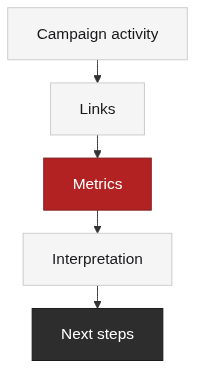
Campaign Activity Summary
The activity summary records the work behind the numbers so the report does not read like a surprise. List outreach sent, content produced, and placements completed and in progress, each with the channel and status, so the link and content work stay visible as separate lines. Clients interpret activity differently: some want volume to see effort, and others want proof that activity maps to a strategy, so separate raw effort from placements that were actually accepted.
Record declined placements with the reason, because a decline because of poor relevance is a quality signal, not a failure. A campaign activity summary also protects the team, since it explains where time went when the metrics lag. Update it as work happens rather than reconstructing it at month end, when details like the date a placement went live are easy to lose.
Links to Report: Placements and Referring Domains
The links section lists what was earned: new links, referring domains, and the target pages that received them, with the placement date and the link attributes. Label the numbers precisely, because referring domains and total backlinks answer different questions: referring domains show breadth, while total backlinks show volume, and our guide on the difference explains when each one matters for a client report . Judge every placement before counting it as a result, using the same quality checks that guide link evaluation , and weigh relevance when a link targets a money page . https://www.trafficlimb.com/referring-domains-vs-backlinks/ https://www.trafficlimb.com/high-quality-backlinks-evaluation-guide/ https://www.trafficlimb.com/relevant-backlinks-link-relevance-seo/
Include the risky links too. A report that only lists wins hides profile risk, and patterns that look unnatural belong in the report with a suggested action rather than in a folder nobody opens; Google’s spam policies describe which patterns are treated as manipulative [1].
Link Building Metrics for the Report
Pick the metrics after the goal, not before it, because the same campaign looks strong or weak depending on what is measured. A link building report that tracks every available number buries the three or four metrics that match the goal; choose one link metric, one SEO metric, and one business metric per campaign goal and set the baseline in advance. Present them as a table with the primary KPI, supporting metrics, baseline, and review cadence, following the data structures that tools like Semrush’s Backlink Audit use for links and attributes [3].
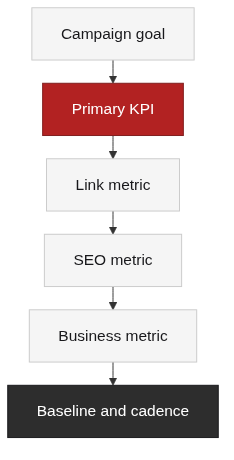
Track link-change fields the way the audit workflow Ahrefs documents suggests [4], then explain what each metric can and cannot prove: rankings can be compared with the baseline, but a single snapshot proves nothing, and authority scores are directional estimates, not guarantees. For teams that report to clients, keep the metric definitions in plain language so the reader can interpret the data without opening a tool, and note the source and collection date under every number.
How to Explain Results and Interpret Data
The interpretation section is where a report earns trust, because it separates what the data shows from what the team claims. Compare actual values with the baseline and the campaign time window, and explain the direction of each metric rather than listing it. Start with what changed, then why it changed, then how the team reached the conclusion and what the report cannot prove, because a result without context invites the client to draw their own conclusion.
Flat or negative results belong in this section too: attribute them to activity volume, placement quality, or the time window before the client does. A link building report that explains results this way also flags limits, for example when removal or disavow actions sit outside what measurement can verify, as Google’s Search Console documentation makes clear [2]. End the section with the one or two numbers that matter most for the goal.
Example Link Building Report
An example report shows how the template reads with real structure instead of empty headings. Imagine a three-month campaign for an e-commerce client with an authority goal: the activity summary lists the outreach and placements completed, the links section lists the new referring domains with dates and quality notes, and the metric table shows referring domain growth against the baseline.
The results section explains that rankings for the target category improved while organic sessions stayed flat, and the interpretation ties that pattern to the time window and the pages that received links. The next steps section then proposes scaling the placements that performed and reviewing the ones that did not. Write the example in plain language and label it as an example so clients do not mistake it for real account data. The template itself stays generic; only the numbers change between clients.
Next Steps and Recommendations
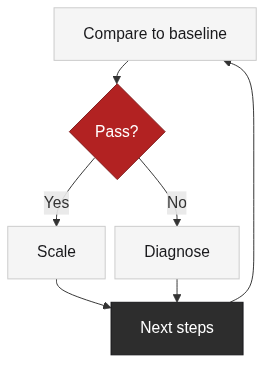
Close the report with decisions, not data. Turn the results into next steps by scaling channels that passed their KPI across reviews and fixing or replacing channels that missed, with an owner and a date for each action. Prioritize recommendations by expected impact and effort, and separate quick wins from work that depends on budget or new content.
When the next step is deciding where the next campaign goes, connect the findings to a gap analysis to prioritize the gaps worth filling backlink gap analysis guide. End with one clear question for the client, such as which goal to prioritize next quarter, so the report leads to a decision instead of a conversation starter. A link building report without next steps is a record; with them, it is a working plan that the next period can be measured against.
FAQ
References
Google Search Central, “Google Search Essentials – Link spam”: https://developers.google.com/search/docs/essentials/spam-policies
Google Search Console Help, “Disavow links to your site”: https://support.google.com/webmasters/answer/2648487
Semrush Knowledge Base, “Backlink Audit”: https://www.semrush.com/kb/859-backlink-audit
Ahrefs Blog, “Backlink Audit: The Complete Guide”: https://ahrefs.com/blog/link-audit/