
How to Disavow Backlinks: When and How to Use Google’s Disavow Tool
 Written by Alistair MacLeod

What the Disavow Tool Is and How It Works
Google’s Disavow Tool exists for one narrow purpose: it tells Google what to ignore when evaluating a site. When people ask how to disavow backlinks, they usually mean the file-based process this article walks through. The tool works by accepting a plain-text file of domains and URLs that you upload through Search Console, and Google then excludes those links from its analysis. It is a signal about which links to ignore, not a command that changes the source pages.
The limits matter more than the mechanics. The tool does not remove links from the web, does not punish the linking site, and does not guarantee a change in rankings [2]. It only changes how Google weighs the links during assessment. That is why the decision to use it belongs late in a cleanup process, after an audit has identified the pattern and removal has been tried. Teams that expect an upload to fix a profile by itself are asking the tool to do something it was not designed to do.
When to Disavow and When Not To
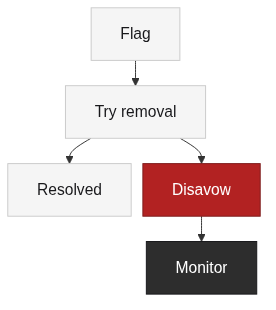
Disavow backlinks only when the profile carries a large volume of spammy or manipulative links that you cannot remove through outreach. Google defines link spam as manipulative behavior and intent, which covers paid links, link exchanges, and automated placements when they are designed to game rankings [1]. A handful of low-quality links does not meet that bar, and a single bad link almost never justifies a file. The trigger is the scale and the pattern, not the presence of one awkward placement. TraffiClimb’s guide to unnatural links explains how to recognize the patterns that qualify.
Try direct removal before disavow, and keep the file as a last resort. The order is deliberate: outreach keeps control with the site owner, while a disavow file hands the decision to Google. A relevant but weak link should be left alone, because ignoring it costs nothing and disavowing it removes a signal that might have helped. When the profile shows hundreds of suspicious links from unrelated sources, and the owners do not respond, the file becomes the practical answer.
Prepare a Disavow File with Domain and URL Syntax
To disavow backlinks correctly, prepare the file as plain text and follow Google’s syntax. Use `domain:` followed by the domain name for an entire domain, and a full URL for a single page; plain lines starting with `#` are comments for your own notes [2]. Export the candidate list from your audit tool so the entries come from real data rather than memory; Semrush documents the record structure that supports this export [3]. When the pattern is domain-wide, the domain line is the honest choice, and TraffiClimb’s comparison of referring domains and backlinks helps you separate domain-level decisions from URL-level ones.
Organize the file by source so it can be reviewed before submission. Group the entries under comment headers, keep related URLs together, and remove anything you are not confident about. Google documents size expectations for the file, and a bloated file with hundreds of uncertain entries is harder to audit than a focused one. Review the list against the profile one more time, because the syntax is unforgiving: a misplaced line can ignore a whole domain you meant to keep.
Submit the Disavow File and Understand Processing Time
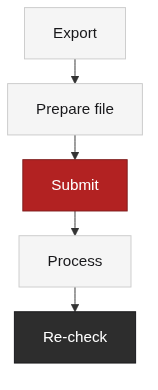
After you decide to disavow backlinks, submit the file in Search Console: choose the property, upload the file, and confirm. Google validates the format and accepts the file, then the request enters its processing queue. The tool does not guarantee when the links stop being considered, and Google does not re-process the file instantly [2]. Plan the submission around the monitoring calendar rather than around a launch date, because the effect arrives on Google’s schedule, not yours.
The same file can be replaced. If the profile changes, export the current version, edit it, and upload again; the new file supersedes the old one. That is why keeping the file in a version-controlled or dated location matters: you need to know what was submitted and when. Processing time also means the follow-up check should happen well after the submission, not the next day, so the report you compare against reflects the file that Google actually processed.
Monitor and Re-Check After Disavow
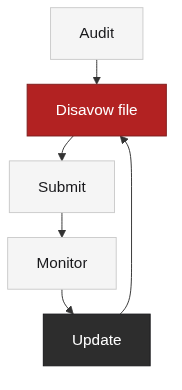
Disavow backlinks does not end with the upload; the profile needs monitoring and re-check after disavow to confirm the file worked. Compare the link reports before and after the submission, and watch for two things: ignored links that keep appearing, and good links that were caught by an overly broad line. Ahrefs documents the audit workflow used for this comparison [4], and TraffiClimb’s backlink gap analysis guide shows how to compare the current profile against a target set while the cleanup is settling.
New spammy links can replace the ones you ignored, so the review should repeat on the same cadence as the rest of the monitoring setup. Keep the disavow backlinks file updated when the profile changes: links you removed from the site can be removed from the file, and new spam patterns can be added. The verification step is what separates a file that was submitted from a file that actually worked.
Common Mistakes and Risks of Disavow
The most common mistakes are disavowing good links, overusing the tool, and skipping removal first. Each mistake shares the same root: treating disavow as a routine cleanup action instead of a last resort. A frequent scenario is a team that uploads a file for every audit finding, including relevant links that were helping. The risks of disavow include harming the profile you meant to protect, and a mistaken entry is hard to reverse because Google has to re-process the corrected file.
Teams that disavow backlinks too broadly often discover later that the lost signals were the ones doing useful work. Protect the links that pass relevance and quality checks: TraffiClimb’s evaluation of high-quality backlinks defines what a link worth keeping looks like, and the guide to relevant backlinks helps you avoid sweeping relevant links into the file. Disavow is not a universal fix and does not replace link building; it only removes a specific kind of noise. If the cleanup process feels heavier than the team can carry, TraffiClimb offers link building services as a related next step, and there is no standalone Disavow service being promoted here.
FAQ
References
Google Search Essentials, “Link spam”: https://developers.google.com/search/docs/essentials/spam-policies
Google Search Console Help, “Disavow links to your site”: https://support.google.com/webmasters/answer/2648487
Semrush Knowledge Base, “Backlink Audit”: https://www.semrush.com/kb/859-backlink-audit
Ahrefs, “Backlink Audit”: https://ahrefs.com/blog/link-audit/