
Backlink Removal: How to Remove Bad and Unwanted Backlinks
 Written by Alistair MacLeod
What Makes a Backlink Bad or Unwanted
Backlink removal starts with a judgment call: which links are bad or unwanted, and which ones are just not impressive? A backlink earns the label when it carries spam signals, comes from an irrelevant source, or follows a manipulative pattern such as a paid placement or a link exchange. Google treats link spam as manipulative behavior and intent rather than a fixed list of domains [1], which is why the same pattern can be harmless in one profile and risky in another. The practical effect is that they need removal when the link is more likely to drag the profile down than to help it.
Not every weak link requires action. A low-authority blog post that never drives traffic is unwanted in an ideal world, but removing it is not worth the effort or the risk of an awkward request. The decision should separate clearly harmful links from low-value links that can stay untouched. This distinction keeps the removal process honest: you spend outreach time on links that genuinely threaten trust or relevance, and you leave the rest alone. Teams that skip this step end up with a removal queue full of noise and no evidence for the requests they actually send.
Evaluate a Backlink Before Removing It
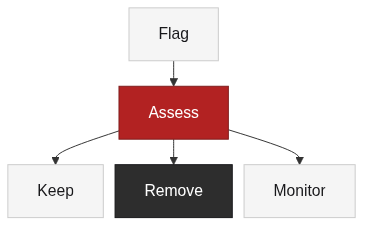
Evaluate backlinks before removing them, because a backlink removal request is a commitment of time and a relationship with another site owner. The evaluation starts with three inputs: relevance, spam signals, and the risk versus benefit of keeping the link. A link from a relevant industry site with a clean history is usually worth keeping even when its anchor text is not ideal. A link from an unrelated domain with a history of manipulation fails the same test, no matter how the page is presented.
The risk side of the equation matters more than most checklists admit. Removing a backlink can change how a page is interpreted, and a mistaken removal can remove a signal that was doing quiet work. Check the referring domain trust, the anchor text, the surrounding page context, and the connection between the source page and the target page before writing to anyone. TraffiClimb’s evaluation of high-quality backlinks walks through the attributes that make a link worth keeping, and the guide to relevant backlinks helps you weigh topical relevance when the context is ambiguous. When the link fails those checks, the removal request has a reason behind it.
Contact Website Owners to Request Link Removal
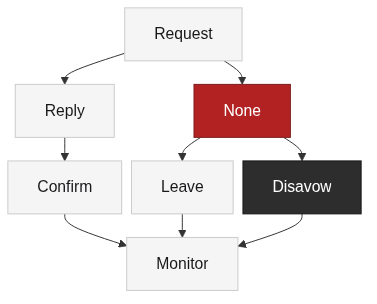
Contact website owners to request link removal through a short, polite outreach process. A backlink removal request works best when it is easy to verify and act on: identify the exact link, explain why you are asking, and provide the source page URL so the owner can find it without hunting. Most owners will not act on a vague request, so specificity is the difference between a completed removal and a thread that stalls. Keep the tone professional and neutral, because the same owner may host a useful placement later.
A workable communication template has four parts: the link location, the request, the reason, and a deadline. State which page contains the link, ask for it to be removed, mention that it does not fit the site’s content or your guidelines, and offer a reasonable window such as a few weeks. Record every request, the response, and any follow-up in the same place where you track the audit, so the history supports a later decision. TraffiClimb’s comparison of referring domains and backlinks is useful here when you need to explain why a single link from an otherwise trusted domain still matters.
Use Alternative Paths When Direct Removal Is Not Possible
Use alternative paths when direct removal is not possible, because some owners never reply and some pages are abandoned. The first alternative is to do nothing and let the link sit: a low-value link that no one notices is usually safer than a failed removal campaign. The second is to treat the link as devalued and keep monitoring it, which works when the link has no practical impact. Backlink removal is not the only answer, and the third path, Disavow, is a formal statement to Google that you do not want certain links considered; Google documents it as a tool for a considerable number of spammy or artificial links and warns that it should be used carefully [2].
The order matters. Direct removal first, then monitoring, then Disavow only when evidence accumulates. Disavow is not a substitute for a removal request, and re-teaching its full operation is out of scope here. The practical rule is to exhaust the paths that keep control with the site owner before using the path that hands the decision to a search engine. This ordering also protects you from the most common failure mode: submitting a disavow file for a handful of links that a single email could have removed.
Monitor and Re-Check After Removal
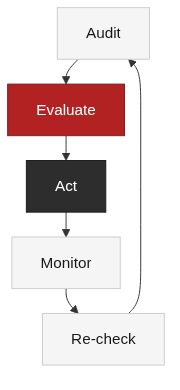
Monitor and re-check after removal, because backlink removal is not finished until the link is confirmed gone. Rerun the audit after the owner confirms the change, compare the old and new reports, and check whether the link reappears under another URL or anchor. Links that return are a sign that the removal did not stick, and new bad links can replace the ones you removed, so the process repeats on the next review cycle. The confirmation step also closes the loop on the record: the request, the response, and the verification belong together.
Re-checking should follow the same cadence as the rest of the monitoring setup, and the alert settings you already have will surface the link if it returns. Watch for related changes, not just the exact URL: the same referring domain may place a new link, or a page migration may move the link to a new target. TraffiClimb’s guide to unnatural links explains the patterns that keep showing up after cleanup, and the backlink gap analysis guide shows how to compare the current profile against a target set while the cleanup is still in progress.
Connect Removal to Backlink Audit, Monitoring, and Disavow
Connect removal decisions to the Backlink Audit and Backlink Monitoring process instead of treating them as one-off tasks. Backlink removal is one output of an audit, and the audit is only as good as the data that feeds it. Semrush and Ahrefs document the record structures that make this work: a backlink report that captures source URL, referring domain, anchor, and attributes gives you the same fields for the removal queue and for the monitoring check after it [3][4]. The connection between removal, monitoring, and disavow is the evidence trail that ties each action to a reason.
Backlink removal should be the middle step in a loop: audit finds the link, evaluation decides, outreach or an alternative path acts, and monitoring verifies. Google’s link spam guidance stays the reference point for whether a pattern crosses the line into manipulation [1], and Disavow remains the narrow, evidence-heavy last resort [2]. This article deliberately avoids re-teaching the full audit or Disavow procedures, which are covered in the related guides. If the process feels heavier than the team can carry, TraffiClimb offers link building services that cover the execution side; there is no standalone removal service being promoted here.
FAQ
References
Google Search Essentials, “Link spam”: https://developers.google.com/search/docs/essentials/spam-policies
Google Search Console Help, “Disavow links to your site”: https://support.google.com/webmasters/answer/2648487
Semrush Knowledge Base, “Backlink Audit”: https://www.semrush.com/kb/859-backlink-audit
Ahrefs, “Backlink Audit”: https://ahrefs.com/blog/link-audit/