
Backlink Monitoring: How to Track New, Lost, and Changed Backlinks
 Written by Alistair MacLeod
Why Continuous Backlink Monitoring Matters More Than a One-Time Audit
A one-time backlink audit gives you a snapshot of where a profile stands on a single day. Continuous backlink monitoring answers a different question: how is that profile changing, and which changes deserve a decision? Sites gain links, lose pages, update anchors, and alter link attributes between audits, so a snapshot quickly goes stale. Monitoring turns the profile into a running record of new, lost, and changed backlinks, which supports an Evaluation-to-Maintenance workflow instead of an occasional cleanup exercise.
The practical difference shows up in decisions. An audit can classify every link at a moment in time, while monitoring tells you what happened since the last review: which new referring domains appeared, which links disappeared, and which existing links changed their target URL or anchor text. Teams that only audit occasionally often discover a loss months later, when the recovery opportunity has passed. Continuous backlink monitoring compresses the time between a change and a response, without requiring a daily manual export of the full profile.
Track New Backlinks and New Referring Domains
New backlinks and new referring domains are the most visible signals in any backlink monitoring report, but they are easy to misread when combined. A single new backlink is one additional link from a source; a new referring domain means a site is linking to you for the first time. The distinction changes how you evaluate the event. One new link from an established domain is usually a small event, while a first link from a new domain can mark the start of a relationship worth tracking.
Set a baseline before interpreting new links. Record first-seen dates, the target page, anchor text, and attributes, then compare each new item with the site’s normal acquisition pattern. A handful of new backlinks after a product launch or an outreach campaign is expected; a cluster of new referring domains with similar anchors and placements is a different signal. Relevant new links can be a healthy sign, and TraffiClimb’s evaluation of high-quality backlinks explains what distinguishes a valuable placement from a weak one. A suspicious cluster belongs in a review queue rather than a celebration, no matter how impressive the raw count looks.
Detect Lost Backlinks and Recovery Opportunities
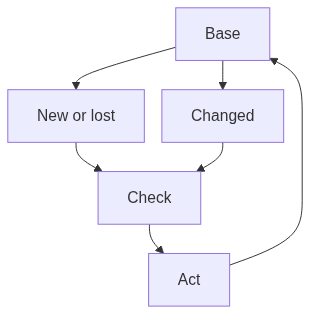
Lost backlinks matter because they are often recoverable. Detecting a lost link early gives you the option to contact the site, restore the placement, or update the target URL; detecting it late usually means the page changed months ago and the reason is harder to reconstruct. A backlink monitoring setup should flag every lost link with the last-seen date and the referring domain so the loss can be investigated rather than silently accepted.
Start the investigation by separating causes. A link can disappear because the source removed it deliberately, because the source page was deleted or moved, or because the crawler simply has not seen the page recently. Those three situations lead to different actions, so do not treat every loss as a rejection. When the value justifies the effort, a polite outreach or a link reclamation request can recover the placement. TraffiClimb’s backlink gap analysis guide shows how to compare the current profile with a target set and find the most promising recovery opportunities without promising a specific outcome.
Spot Changed Backlinks: Anchor Text, Target URL, and Link Attributes
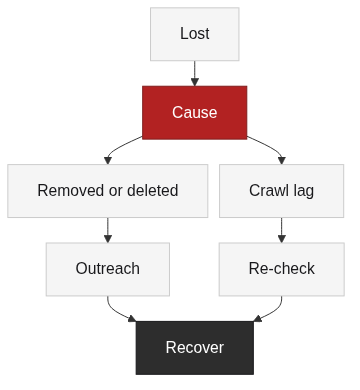
Changed backlinks are the signal that most monitoring setups underuse. A backlink rarely disappears without warning; it often changes first. The anchor text may shift, the target URL may redirect to another page, or the link attributes may gain a nofollow or sponsored value. Identifying changed backlinks means comparing the current record with the previous one and treating any difference as a monitoring signal, not as automatic proof of harm.
Each change type has a different meaning. An anchor shift can reflect a site’s editorial update or an attempt to manipulate placement. A target URL change can indicate a migration, a redirect, or a deliberate move to another page. An attribute change can follow a policy update on the source site. Record the old and new values, the date of the change, and the referring domain, then decide whether the difference matters for relevance. TraffiClimb’s guide to relevant backlinks explains how to weigh topical relevance when a link’s context changes, and TraffiClimb’s comparison of referring domains and backlinks helps you separate domain-level changes from individual link changes.
Configure Monitoring Tool Dashboards and Alerts
Monitoring tool dashboards turn raw exports into a place where changes surface. A backlink monitoring setup that depends on manual exports rarely survives a busy week, so configure the tool once and let the dashboard carry the load. Semrush and Ahrefs both provide example data structures that show new, lost, and changed backlinks side by side, and their alert settings can notify you when a referring domain appears or a link drops. Ahrefs documents how those inventory fields are built and reviewed [3], and Semrush’s knowledge base shows the same record structure in its backlink reports [4].
Alert settings deserve careful tuning. A useful alert tells you what changed and where to look; a noisy alert buries the real signal. Start with new referring domains, lost backlinks, and major attribute changes, then add anchor or placement alerts only when the volume is manageable. Dashboards are for surfacing change, not for judging quality. The judgment still requires the page context that a report row cannot capture, so treat the alert as the start of a review, not the end of one.
Define Monitoring Report Fields and Check Frequency
Monitoring report fields and check frequency should be defined before the tool starts generating output. Without fixed fields, two exports cannot be compared, and a change becomes a rumor instead of a record. At minimum, keep source URL, referring domain, target URL, anchor text, link attributes, first-seen, last-seen, and the tool that produced the record. Add a status field for the decision so a report can move from observation to action.
Check frequency depends on the site’s acquisition activity and the cost of review. A site that earns links steadily can review weekly and reconcile monthly; a quieter site can review monthly. The frequency matters less than the trigger: define what kind of change would cause an earlier review, and document that rule so the cadence survives staff changes. Noisy or duplicate alerts should be filtered, because a report that cannot be trusted stops being read. The discipline is to keep the fields stable and let the check frequency change with evidence rather than habit. The report is where backlink monitoring becomes an operational routine instead of a folder of exports.
Connect Monitoring Anomalies to Removal and Disavow
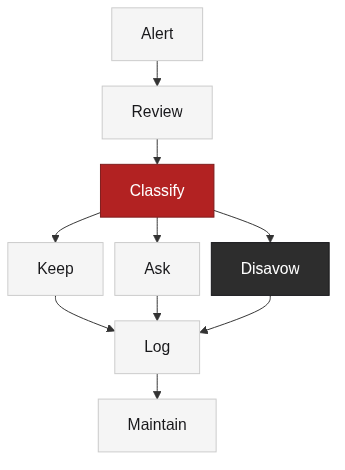
Monitoring anomalies only become actions when they survive a review. The point of connecting monitoring anomalies to removal and Disavow decisions is to reserve the strongest responses for evidence, not for surprise. Google describes link spam as manipulative behavior and intent, and it is the reference point for deciding whether a pattern crosses that line [1]. Disavow carries its own risk; Google explains that the tool is intended for a considerable number of spammy or artificial links and that incorrect use can harm performance [2].
Most anomalies resolve into keep, contact, or monitor rather than removal or Disavow. Removal makes sense when a practical, documented request can change the source page; Disavow should stay a narrow, evidence-heavy last resort. TraffiClimb’s guide to unnatural links walks through the patterns that justify a stronger response, while this article deliberately avoids re-teaching the full removal or Disavow procedure. A backlink monitoring loop surfaces the anomaly and preserves the evidence so the escalation path has something real to evaluate. If the team needs execution support, TraffiClimb offers link building services as a related next step, but this article does not present a standalone monitoring service.
FAQ
References
Google Search Essentials, “Link spam”: https://developers.google.com/search/docs/essentials/spam-policies
Google Search Console Help, “Disavow links to your site”: https://support.google.com/webmasters/answer/2648487
Ahrefs, “Backlink Audit”: https://ahrefs.com/blog/link-audit/
Semrush Knowledge Base, “Backlink Audit”: https://www.semrush.com/kb/859-backlink-audit