
Best Link Prospecting Tools for Finding Backlink Opportunities

What Link Prospecting Tools Solve
Link prospecting tools solve the data problems of prospecting: finding candidates, understanding their context, reaching the right person, and keeping the process organized. Without tools, discovery depends on manual searching, research is slow to compare, and contact details are hard to find at scale. Tools turn those tasks from a series of one-off searches into a repeatable workflow [1].
Tools do not solve the judgment problems. Relevance, quality, and fit still have to be decided by a person, and no tool can tell you whether a site will actually link to you. Treat tools as force multipliers for the prospecting framework, not as a replacement for it.
Classify Tools by Task, Not by Brand
The practical way to compare link prospecting tools is by the task they support, because most tools span several categories and a single tool rarely covers the whole pipeline. Six tasks cover most of the work: discovery, competitor backlink research, contact discovery, email verification, qualification, and outreach management with tracking.
Use the task list to build your stack. A backlink tool like Ahrefs, Semrush, or Moz covers discovery and research. A contact tool like Hunter or Apollo covers finding people. A verification tool like ZeroBounce protects deliverability. An outreach platform like BuzzStream, Pitchbox, Mailshake, or Instantly covers sending, follow-up, and tracking. The diagram below maps the tasks to the tools in this guide.

Prospect Discovery Tools
Prospect discovery tools help you find candidate sites that cover your topic and would plausibly link to your page. The backlink platforms lead here: Ahrefs positions itself as an AI marketing platform powered by large search and AI databases, Semrush as a platform for growing and measuring brand visibility across search, and Moz as SEO software for link research and content marketing. Even a plain search engine is a discovery tool when you search for topic plus “resources,” “roundup,” or “best guides” [3].
Start discovery with the sources you already have. Use a search engine for topic and resource pages, and use a backlink tool to expand from the pages that already rank for your terms. Discovery is a volume step, so the goal is a candidate pool, not a final list.
Competitor Backlink Research Tools
Competitor backlink research tools show you where pages like yours already earn links, and they are the core of gap analysis. Ahrefs, Semrush, and Moz each provide backlink analysis surfaces that list referring domains and link context for a page or domain. These tools answer the same question in different interfaces, so the choice usually comes down to data coverage, workflow fit, and budget.
Use the research output to build the gap list: sites that link to your competitors but not to you. The competitive link analysis guide explains how to read a competitor profile, and the backlink gap analysis guide shows how to turn the comparison into a prioritized prospect list.
Contact Discovery Tools
Contact discovery tools find the person behind a site and the email address to reach them. Hunter positions itself as a solution to find and verify professional email addresses, and Apollo as an AI sales platform for prospecting and lead generation. Both are built for finding people, with Hunter closer to a focused email finder and Apollo closer to a full B2B data platform.
Use contact tools after the prospect passes the relevance and quality checks, because finding an email is wasted work on a site you will not contact. Record the contact route in the prospect list, and note any submission guidelines the site publishes.
Email Verification Tools
Email verification tools reduce bounces by checking whether an address is valid before you send. ZeroBounce positions itself around email validation, list cleaning, and address verification to reduce spam traps and improve deliverability, and Hunter also offers verification alongside its finder. Verification matters because a high bounce rate damages the sender reputation your outreach depends on [5].
Verify in batches before a send, and treat the results as a filter rather than a guarantee. Verification services improve accuracy, but no service can promise that every address on your list will deliver, so keep your own sending reputation as the backstop.
Qualification Tools
Qualification tools provide the data signals that inform fit decisions: domain metrics, page metrics, referring domain counts, and content context. Ahrefs, Semrush, and Moz all expose metrics you can use to score a prospect, such as the strength of a domain or page profile and the relevance of the linking context. The relevant backlinks guide explains how fit interacts with these signals.
Use the metrics as inputs to your qualification checklist, not as the verdict. A metric can summarize a profile, but it cannot tell you whether the site’s audience matches your page. Score relevance first, then use the tool data to rank within the relevant group.
Outreach Integration Tools
Outreach integration tools connect the prospect list to the sending workflow, so qualified prospects move into emails without re-entering data. BuzzStream positions itself as an all-in-one digital PR and link building solution for managing outreach and relationships, and Pitchbox as an AI outreach platform for link building that helps find publishers, personalize, and scale outreach. Mailshake and Instantly both position themselves around sales engagement and automated outreach.
The right platform depends on how you run campaigns. BuzzStream suits relationship-heavy link building where you track conversations over time, Pitchbox suits scaled link building campaigns, Mailshake suits simple cadences, and Instantly suits high-volume cold email. Match the platform to your volume and your way of working.
Personalization and Follow-up Support
Personalization and follow-up support turn a sending tool into an outreach tool, because cadences, scheduling, and tracking are what make follow-ups practical. Mailshake and Instantly build outreach sequences with follow-ups, and BuzzStream and Pitchbox track the state of each prospect so you can personalize the next touch. The mechanics of the follow-up matter less than the content, which still has to come from your research [5].
Use the tool’s scheduling to enforce a disciplined follow-up rhythm: a first email, a follow-up that adds value, and a closing touch. The templates in the outreach email templates guide show what each touch should say.
Campaign Tracking
Campaign tracking tools record the state of every prospect and the outcome of every send, which is what makes the pipeline measurable. BuzzStream, Pitchbox, and Mailshake all provide views of sent, replied, positive, negative, and closed prospects, with activity history attached to each record. Tracking turns outreach from a memory into a dataset you can review.
Track the conversion of the pipeline, not just the send volume. Log the reply, the positive, and the placement per batch, and compare batches over time. The link building outreach guide explains how the tracker feeds the next round of optimization.
Team Collaboration
Team collaboration features decide whether a tool works for one person or for a group. BuzzStream and Pitchbox are built around shared outreach workflows, with prospect records, notes, and activity visible to the whole team, which matters for agencies and in-house teams running campaigns together. Lighter setups can share a prospect list in a spreadsheet, at the cost of history and structure.
Choose the collaboration layer by team size. A solo operator can run a spreadsheet plus a cadence tool, while a team of several people usually needs a shared outreach platform to avoid duplicated contacts and lost context. If the team only needs a shared list, start with the spreadsheet before paying for a platform.
Integrations
Integrations determine how easily a tool fits your existing stack, and most tools in this guide connect to the common workflow surfaces: spreadsheets for lists, email providers for sending, and other marketing platforms. The practical minimum is a way to export and import prospect data, because that is how the list moves between discovery, verification, and outreach.
Do not assume a specific integration exists without checking the vendor’s site. When you compare tools, list the two or three integrations you actually need, such as your email provider or your project tracker, and confirm them before you commit. Integration depth is a selection criterion, not an afterthought.
Which Tools Fit Which Users
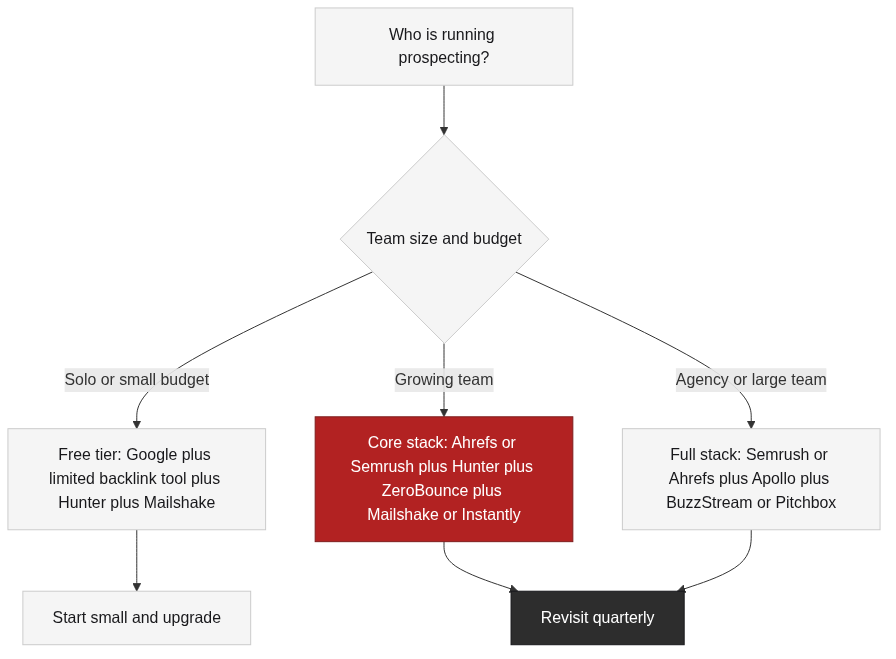
The tools split into three profiles by user. Solo operators and small teams get the most from a search engine, one backlink tool, a contact finder with a free tier, and a simple cadence tool. Growing teams usually add verification and a more complete outreach platform. Agencies and large teams tend to run a full stack with a shared outreach platform and a broader contact database.
Match the profile to the budget, not to the marketing. A solo operator paying for three platforms wastes money on overlap, while an agency running a full stack on free tiers wastes time on manual work. Start with the smallest stack that covers the tasks, and add tools when the workflow demands them.
Limitations of These Tools
Every tool in this guide has limits. Backlink databases are snapshots, so data can lag and differ between vendors. Contact data can be out of date, and verification reduces but does not eliminate bounces. Outreach platforms automate sending, but they do not write the personalization or judge the fit. None of these tools replace the qualification decisions that make prospecting work [2].
The biggest limitation is cost and overlap. Most tools are subscriptions, and the features you need are often split across categories, so a stack of three tools is common and five is already a lot. Budget for the tasks, not the brand names, and re-evaluate the stack quarterly as the workflow changes.
How to Combine Tools Into a Workflow
Combine tools by task order: discover with a search engine and a backlink tool, expand with competitor research and gap analysis, find and verify contacts, qualify the list, then send and track with an outreach platform. Each stage hands a clean list to the next, and the spreadsheet or outreach platform holds the single source of truth.
The diagram below shows the combination. The core stack is one backlink tool plus one contact tool, with verification and an outreach platform added as volume grows. Keep the stack minimal, and change one tool at a time so you can measure the effect.

Final Selection Recommendation
The final recommendation is task-based, not brand-based. For most solo and small-team readers, start with Google Search, one backlink platform from Ahrefs, Semrush, or Moz, Hunter for contacts, and Mailshake or Instantly for sending. For teams and agencies, add ZeroBounce for verification and choose BuzzStream or Pitchbox as the shared outreach platform, with Apollo as an option when you need broader B2B contact data.
Match the recommendation to your constraints: data coverage, budget, team size, and the integrations you need. The selection should be reviewed quarterly, because tools change pricing and features, and your workflow changes as the campaign matures.
How These Tools Were Verified
The final tools in this guide were verified against their official websites on 2026-08-20 with read-only access, and the evidence is recorded in the Run verification file with each source URL, the verification time, and the verified page content. The verification covered whether each tool still operates and how it positions itself; it did not include testing the tools, scraping competitor data, accessing user data, or submitting any form.
The verification records are part of this Run’s evidence and are the basis for every positioning statement in this guide. No reply rate, success rate, or customer result is claimed for any tool, and no tool is presented as tested by TraffiClimb or by this Run.
FAQ
References
Google, “SEO Starter Guide,” developers.google.com. Official documentation describing links among the signals that help pages gain visibility, and why quality matters.
Moz, “Backlinks,” moz.com. Public glossary explaining what backlinks are and why relevance and context determine their value.
Ahrefs, “Link Building for SEO: The Definitive Guide,” ahrefs.com. Public industry guide covering link audits, competitor analysis, and prospecting.
Backlinko, “Link Building Strategies,” backlinko.com. Public industry guide surveying link building methods and how tools fit into them.
Search Engine Journal, “Link Building,” searchenginejournal.com. Public industry article covering outreach best practices, deliverability, and measurement.
Next Steps
Link prospecting tools work best as a small task-based stack: a backlink platform for discovery and research, a contact tool for finding people, verification for deliverability, and an outreach platform for sending and tracking. Choose the stack by task, start small, and re-evaluate it quarterly as the workflow changes.
After the tools are chosen, the link prospecting guide shows how to build and qualify the list the tools feed, and the outreach email templates guide covers the messages to send once the list is ready. If you would rather focus on strategy while a specialist handles the execution, TraffiClimb builds premium link building programs for ambitious brands; visit the TraffiClimb website to see how the approach works.