
Link Building Outreach Email Templates: Examples, Personalization, and Follow-Ups

What Makes an Outreach Email Template Work
An outreach email template works when it makes the next step obvious: the reader sees why you wrote, what you want, and why it is worth a few minutes of their time. The structure does the heavy lifting, and the personalization makes the message specific enough to be believed. A template without a clear request, or without any evidence you looked at the site, fails no matter how polished it reads.
Treat every template here as a skeleton with the same seven parts: subject, opening, context, value, request, CTA, and signature. Fill the context and value with details from your prospect research, and keep the request to one ask. The link building outreach guide explains the full pipeline that these templates support, from the first message to the final placement.
Outreach Email Anatomy: Subject, Opening, Context, Value, Request, CTA, Signature
The anatomy is the checklist every template follows. The subject line earns the open, the opening line earns the read, the context shows why this site, and the value shows why this reader should care. The request names the action, the CTA makes it easy to take, and the signature keeps the message human and reply-friendly.
Each part has one job, and the whole email stays short. If a part has nothing to say, cut it instead of padding it, because a long email is a signal that the sender is mass mailing. The diagram below shows how the parts connect and where personalization enters.

What Real Personalization Is
Real personalization is evidence that you looked at the site, not a first-name merge. Mention a specific article, a pattern in what the site links to, or how your page fits a topic the site already covers. That evidence is what separates a template from a message, and it is the cheapest way to raise the odds of a reply [2].
Personalization costs time, so spend it where the prospect is strong. For a highly relevant prospect, write a sentence or two of real context. For a marginal prospect, the research cost is rarely worth it. Personalization is a quality filter, and it works best after you have qualified the list [2].
General First Outreach Email Template
The first outreach template is the default for a relevant site with no specific trigger, and it asks for a link to a page that fits the site’s content. The subject names the topic and the page, the opening references the site, and the request points to a specific placement idea.
Subject: A resource for your [article or topic] on [Site Name]
Hi [Name],
I read your post on [specific article] and noticed you link to resources about [topic]. I put together [page title], which covers [angle] with [what makes it useful].
If it fits, I would suggest adding it under [section or context] with the text “[suggested anchor].” The page is here: [URL].
Thanks for considering it.
[Your name], [role, site]
The template works when the page genuinely fits the section you name. If the fit is weak, the request reads as spam, so check the placement idea before you send. Send this after you have qualified the prospect, not before [3].
Guest Posting Outreach Template
The guest posting template pitches a topic to a site that accepts contributed posts, and it leads with a proposed angle rather than with yourself. The subject names the pitch, the opening shows you know the site’s coverage, and the value explains what the post will do for their readers.
Subject: Post idea for [Site Name]: [topic angle]
Hi [Name],
I follow [Site Name] and noticed you cover [topic area] for [audience]. I would like to pitch a post on [angle], covering [main points].
The post would include [what it delivers: examples, a framework, a checklist], and it would fit your format. I have not published it anywhere else.
Would this work for your editorial calendar?
Thanks,
[Your name]
The pitch only works when the site accepts guest posts, so check the contributor guidelines first. Keep the idea specific to the site, and do not attach a finished draft unless the guidelines ask for one. The guest posting guide covers the method beyond the email.
Broken Link Outreach Template
The broken link template offers a replacement for a dead resource on the target page, and it is the closest thing outreach has to a favor. The subject names the broken page, the opening confirms you found the issue, and the request offers your page as a working alternative.
Subject: Broken link on [Site Name]: [dead URL or anchor text]
Hi [Name],
While reading [page URL] on [Site Name], I found a broken link pointing to [what it should have been]. I built [your page], which covers the same topic and is live at [URL].
If you replace the broken link with [your page], your readers will get a working resource.
Thanks,
[Your name]
The template depends on a real broken link, so verify the target is actually dead before you send. The broken link should be relevant to your page, not just any 404 on the site. The broken link building guide explains how to find and scale these opportunities.
Resource Page Outreach Template
The resource page template asks to be added to a curated list, and it works because the page exists to link out. The subject names the list, the opening shows you found the resource page, and the request positions your page as a natural addition.
Subject: A resource for your [topic] list on [Site Name]
Hi [Name],
I found your [topic] resource page and the section on [related topic]. I created [your page], which covers [angle] and includes [what makes it useful: data, examples, a tool].
If it fits, it would sit well alongside the [existing entry] you already link to: [URL].
Thanks for considering it.
[Your name]
The template works when your page is genuinely better or different from what the list already has. Read the list before you send, and only propose a placement that improves it. The resource page link building guide covers the method in more depth.
Linkable Asset Promotion Template
The linkable asset template promotes a page built to earn links, such as original data, a study, or a useful tool, to sites that reference the same topic. The subject names the asset, the opening shows how the site has covered the topic, and the value gives the site’s readers something new to cite.
Subject: Data your readers may want to cite on [topic]
Hi [Name],
You recently wrote about [topic] in [article]. We published [asset type] on [topic] covering [key finding or feature], based on [source of the data].
If you update or expand that piece, you are welcome to reference the data with a link to [URL].
Thanks,
[Your name]
The template works when the asset stands on its own and matches the site’s coverage. Do not pitch an asset that is thin or unrelated, and do not claim the data proves more than it does. The linkable assets guide explains how to build a page worth promoting.
Unlinked Mention Outreach Template
The unlinked mention template asks for a link where your brand is already mentioned in text, and it is the lowest-friction request in outreach. The subject names the mention, the opening shows where it appears, and the request asks for a simple hyperlink.
Subject: A small update to your article on [Site Name]
Hi [Name],
Your post on [article] mentions [your brand] in the section about [context]. The mention is helpful, but it is not linked to our site.
Could you add a link to [URL] on that mention? It would make the reference complete.
Thanks,
[Your name]
The template works when the mention is real and the link adds value for the reader. Check the exact wording before you send, and do not ask for a link in a context where it would not make sense. The unlinked mentions guide covers the recovery process in detail.
General Editorial Outreach Template
The general editorial template is for sites that do not fit the other scenarios, such as a newsroom, a newsletter, or an industry publication, and it leads with a story or a useful angle rather than a link request. The subject names the angle, the opening shows you understand their coverage, and the value frames your page as material their audience will use.
Subject: A useful angle on [topic] for [Site Name]
Hi [Name],
I read [article or newsletter] on [Site Name] and thought your readers would be interested in [angle], based on [your page or asset].
The material covers [main points] and is available at [URL]. I am happy to share more context or a shorter summary if it helps.
Thanks,
[Your name]
The template works when the angle is genuinely newsworthy or useful to their specific audience. Editorial outreach is a long game, so keep the message brief and do not expect a link from a single touch. The reply is the goal; the link comes later.
Follow-Up Principles and Templates
Follow-ups earn most of the replies, and they work when they add information instead of repeating the ask. Send one follow-up that adds value, such as a relevant section or a recent update, and a second that closes the loop politely. After the second follow-up, mark the prospect as closed and log the outcome [5].
Follow-up 1 (adds value):
Subject: Re: [original subject]
Hi [Name],
Just adding one thing to my earlier note: the [section or update] on [page] may make the fit clearer. It covers [what changed].
The request still stands, and there is no pressure either way.
Thanks,
[Your name]
Follow-up 2 (closes the loop):
Subject: Re: [original subject]
Hi [Name],
I will take this as a pass unless I hear otherwise. If the page becomes useful later, feel free to reach out.
Thanks for your time,
[Your name]
Follow-ups work on cadence and value, not on volume. Space them a few working days apart, and never send a follow-up that only says “bumping this.” The diagram below shows the sequence.

Good vs Bad Outreach Email
A good outreach email is short, specific, and easy to answer. It names the site, shows evidence of research, explains the value for the reader, and makes one clear request. A bad outreach email is generic, long, self-centered, or vague, and it usually disappears into the recipient’s spam folder.
Compare the two in practice. A good email says “I read your post on X and noticed you link to resources about Y; my page covers Z and would fit under the section about Q.” A bad email says “I run an SEO agency and I would love to get a link from your site” with no context. The difference is research and a single specific ask [4].
Common Outreach Email Mistakes
The common mistakes repeat across campaigns: sending a generic template, skipping the context, leading with the request, asking for more than one thing, using a misleading subject line, and never following up. Each mistake reduces the reply rate, and together they turn a good list into a silent inbox.
Most of these mistakes are fixable before sending. Read the email as the recipient: does it show you looked at the site, and is the ask clear? If not, rewrite before you send. When replies stay low across many prospects, the problem is usually upstream in the list or the page, not in the template [3].
How to Adapt Templates to Your Scenario
Adapt a template by changing three things: the context, the value, and the request. The context must come from the specific site, the value must match what that audience needs, and the request must fit the method you are using. Keep the structure, replace the filler, and test one variable at a time.
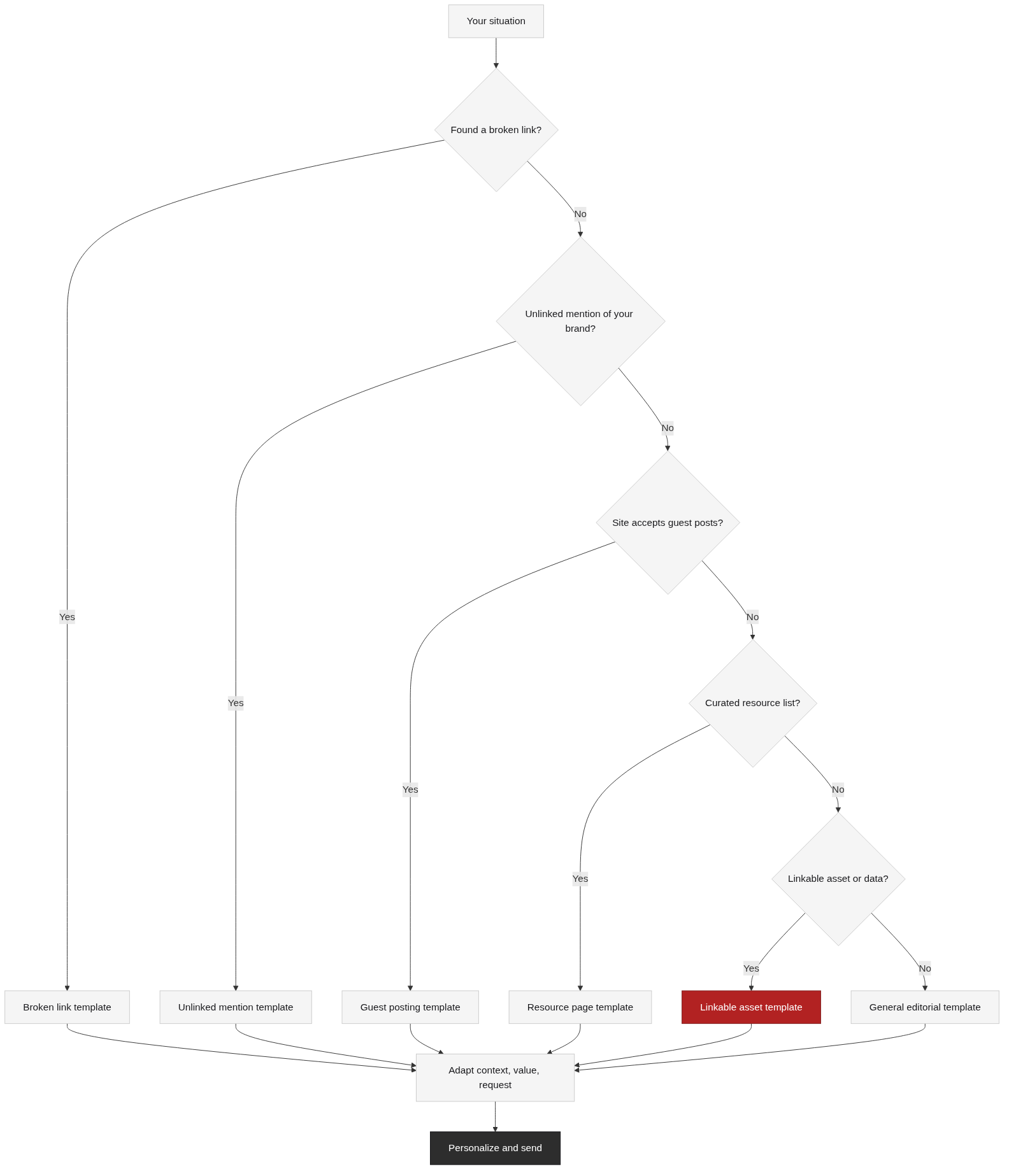
The scenario decides the template. Use the general template for a first contact with a relevant site, the guest posting template when the site accepts posts, the broken link template when you found a dead resource, the resource page template for curated lists, the asset template for data and tools, and the mention template for unlinked brand mentions. Match the method before you write, because the wrong template reads as a template.
FAQ
References
Google, “SEO Starter Guide,” developers.google.com. Official documentation describing links among the signals that help pages gain visibility, and why quality matters.
Moz, “Backlinks,” moz.com. Public glossary explaining what backlinks are and why relevance and context determine their value.
Ahrefs, “Link Building for SEO: The Definitive Guide,” ahrefs.com. Public industry guide covering outreach planning, templates, and common mistakes.
Backlinko, “Link Building Strategies,” backlinko.com. Public industry guide surveying link building methods and how outreach fits into them.
Search Engine Journal, “Link Building,” searchenginejournal.com. Public industry article covering outreach best practices, follow-ups, and measurement.
Next Steps
Outreach email templates are only as good as the list and the page behind them, so before you send, check that each prospect passes your qualification bar and that the target page deserves the link. Start with the general template, adapt the context and value for the first batch, and measure the replies before you scale.
When the list is ready, the link prospecting guide shows how to build and qualify it, and the link building outreach guide explains the full workflow these emails are part of. If you would rather focus on strategy while a specialist handles the execution, TraffiClimb builds premium link building programs for ambitious brands; visit the TraffiClimb website to see how the approach works.