
Link Reclamation: How to Find and Recover Lost Backlinks

What Link Reclamation Actually Is
A backlink is a link from one page on another website [2], and link reclamation starts when one of those links stops working. The target page was removed, the URL changed without a redirect, or the linking site edited the page and dropped your link. In all three cases, the link still exists in the site’s backlink profile, which means the opportunity is still there.
Links remain one of the signals search engines use to decide which pages deserve visibility, which is why Google’s SEO starter guide still lists them among the factors that help a page become important [1]. Recovering a link preserves that signal instead of rebuilding it. The method is deliberately narrow: it recovers links that already existed. It is not unlinked mention outreach, which turns a mention without a link into a new link, and it is not broken link building, which finds dead pages on other sites and offers your content as a replacement.
When Link Reclamation Is Worth the Effort
Link reclamation earns its keep when you have a real backlink history to work with. Sites with years of content, moved pages, or changed domains have the most to recover; a brand-new site with almost no links has very little to find. The highest-value targets are links that pointed to your best pages and disappeared, because restoring them brings back both referral traffic and context.
The method is a weak fit when your link profile is thin, when the removed links pointed to pages you no longer want to rank, or when you have no working page to offer as the replacement. Recovery also requires patience: most outreach goes unanswered, and the method only pays off at volume [3]. The pillar guide to link building strategies ranks the methods by effort and fit, and link reclamation sits at the low-effort end for established sites.
How to Find Lost or Dead Backlinks
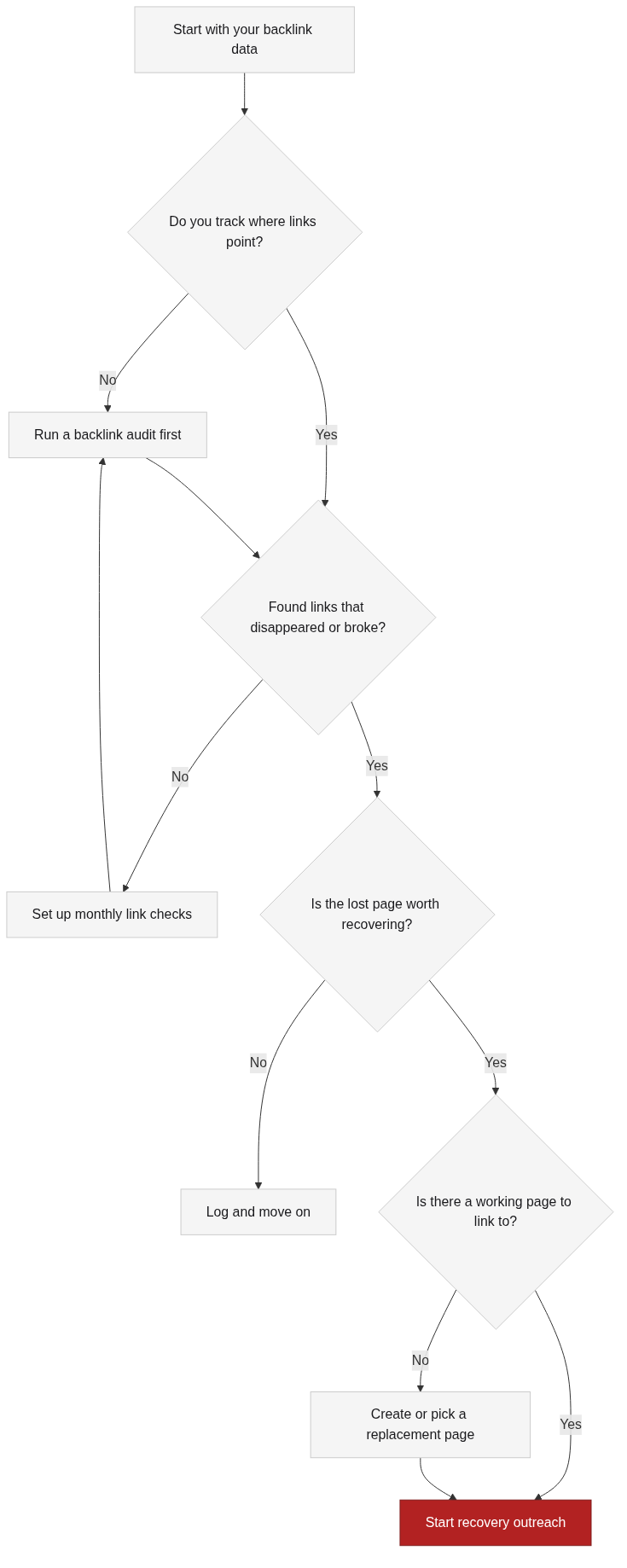
Start from your backlink data, not from memory. Export your link profile, filter for links to pages you still care about, and check the live status of each one. Look for three patterns: links that return a 404, links that redirect somewhere unexpected, and links where the page still loads but your link is gone.
The first pass is a triage, not a full recovery. Split the list by value: links to money pages or core guides matter more than links to old posts you have already consolidated. That triage decides where your outreach time goes, and it is the step most teams skip when they open a list of dead links and start emailing everyone at once.
How to Recover a Lost Link
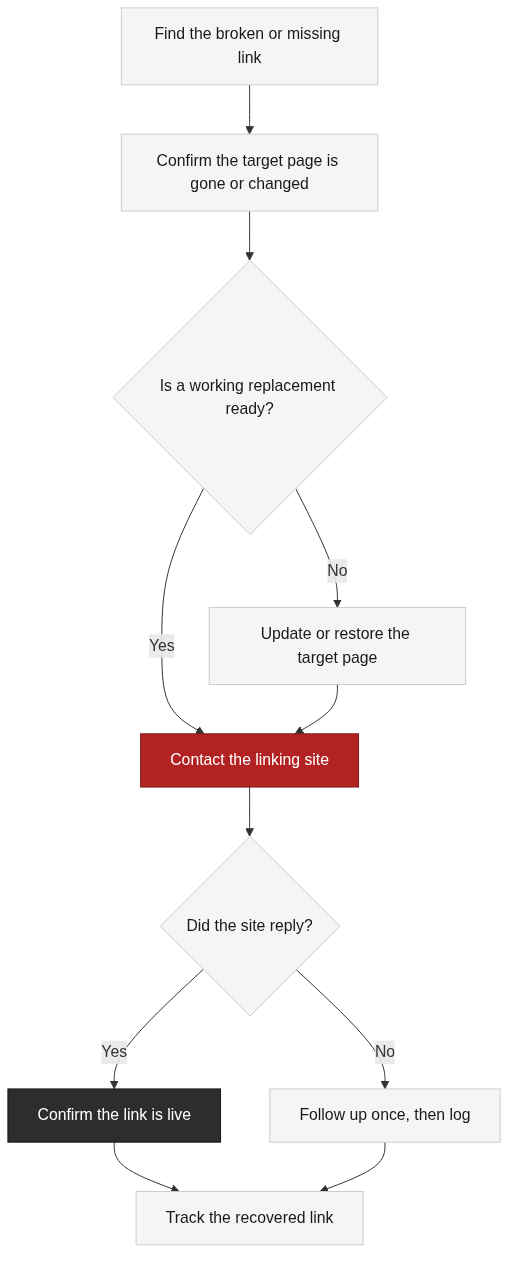
Recovery is a short outreach loop with one clear ask: point the existing link to a working page that serves the same purpose. Before you contact anyone, confirm the replacement is ready. If the target page was moved, a redirect usually fixes it. If it was removed, you need a live page that matches the original intent, which may be a newer article, an updated guide, or a page you consolidate from several old ones.
When the replacement is ready, contact the linking site with the original URL, what changed, and the working URL to use instead. Keep the message short and make the fix trivial for the site owner. Most recovery links come from editors who want to keep their pages working; the pitch is simply helping them do that [3].
Mistakes That Make Reclamation Fail
The most common mistake is treating link reclamation as unlinked mention outreach. A mention without a link is a different opportunity with a different ask, and mixing the two produces pitches that fit neither page. Broken link building is also different: it targets dead pages on other sites, while link reclamation targets links that once pointed to you. The boundaries matter because the outreach and the expectations change.
Two more mistakes are quieter. Sending the same message to every site ignores the reason each link disappeared, and a site owner can usually tell. And chasing every lost link, including ones that pointed to pages you retired on purpose, wastes time that should go to high-value recoveries. Log the low-value cases and revisit them when the asset changes.

How to Measure Link Reclamation Results
Track the same numbers you would track for any link campaign: links recovered, referral traffic restored, and pages that stay live over time. A recovered link is a win when it loads, points to the right page, and sends visitors again. The referral traffic matters more than the raw count, because a link on a page nobody reads is worth less than one in a relevant context [4].
Compare recovered links against each other over a few months and use the pattern to decide which sites deserve a follow-up. If the same pages keep losing links, fix the underlying cause, such as a missing redirect or a URL that keeps changing, instead of re-running the same recovery [5].
FAQ
References
Google, “SEO Starter Guide,” developers.google.com. Official documentation describing links among the signals that help pages gain visibility.
Moz, “Backlinks,” moz.com. Public glossary explaining what backlinks are and why relevance matters.
Ahrefs, “Link Building for SEO: The Definitive Guide,” ahrefs.com. Public industry guide describing link audits and outreach as part of link building.
Backlinko, “Link Building Strategies,” backlinko.com. Public industry guide covering proven methods, including link recovery.
Search Engine Journal, “Link Building Strategies,” searchenginejournal.com. Public industry article surveying link building methods and their trade-offs.
Next Steps
Link reclamation is a steady, low-ego process: find the links that disappeared, triage by value, and ask for the fix with a working replacement ready. It pairs naturally with the other methods in the cluster, and the pillar guide shows how link reclamation fits beside guest posting, niche edits, and the rest. When a lost link pointed to a page you removed, the linkable assets guide explains how to build a replacement worth re-linking.
If you would rather focus on the strategy while a specialist handles execution, TraffiClimb builds premium link building programs for ambitious brands.